
IPTV Solutions

IPTV for Hotels and Commercial Buildings in Las Vegas

One Ethernet network can carry live video to every screen in a hotel, office, or commercial facility. We install the cabling, configure the equipment, and integrate it with your network, then test it and stay available for on-site technical support.

Where commercial IPTV makes sense

IPTV replaces point-to-point coax and standalone boxes with video that travels over standard Ethernet. That gives a property one infrastructure to cable, document, and maintain, as long as the network is built to carry it properly.

Hotels and hospitality properties

Guest rooms, lobbies, restaurants, fitness areas, and back-of-house screens all need a reliable path back to the headend. We plan the cabling, closet and rack space, and switch capacity per floor or building, and we install and configure receivers room by room, working around occupied areas where the property allows.

Offices and corporate facilities

Lobby displays, conference rooms, training spaces, and break-room screens can share the building network. We keep video traffic planned and separated from everyday office traffic, and we coordinate with your IT team on VLANs and switch settings.

Other commercial facilities

Restaurants, venues, waiting areas, and mixed-use buildings with many screens benefit from one managed Ethernet system instead of a separate box and cable at each display. Scope depends on the screen count, the building layout, and the platform you choose.

Real commercial IPTV equipment

Haivision IPTV boxes and video hardware

Starting with the Haivision MCS product lineup, here are specific commercial models worth knowing. Set-top boxes sit at the TV; encoders and professional decoders serve different parts of a video system. These are equipment examples for planning, not a list of products we stock or sell.

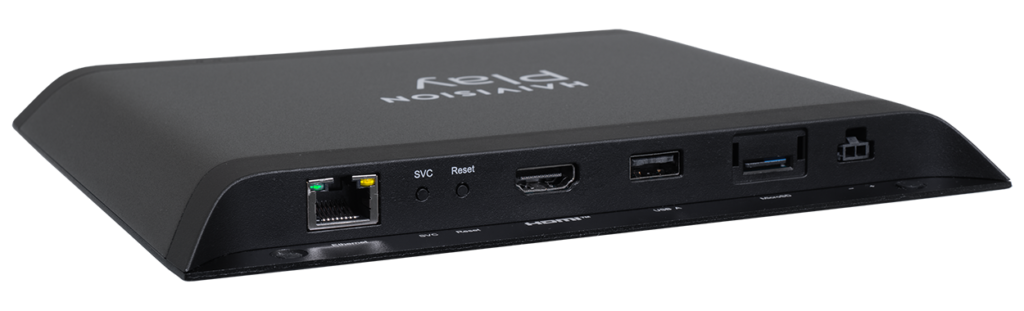
Haivision Play set-top box family, manufacturer product image
TV set-top box

Haivision Play 2000-C

An enterprise IPTV receiver for a display. The 2000-C supports H.264/HEVC playback up to 4K/UHD, HDMI output, and a Gigabit network connection with PoE+.

Typical role: For TVs in conference rooms, common areas, and managed commercial spaces.

View manufacturer specifications
See manufacturer product details
TV set-top box

Haivision Play 4000

A documented Play-series enterprise receiver with HD and 4K display capabilities. Model revisions and Haivision Media Platform versions have specific compatibility requirements.

Typical role: Another commercial display endpoint to evaluate when selecting a Haivision IPTV system.

View manufacturer specifications
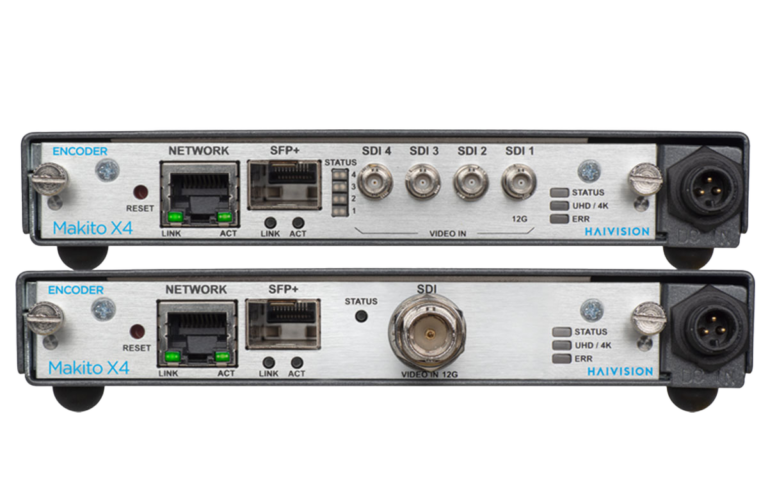
Haivision Makito X4 encoder, manufacturer product image
Video encoder

Haivision Makito X4 Encoder

A professional source-side encoder that takes live video and streams it over an IP network, with support for 4K UHD/HDR and low-latency workflows.

Typical role: For feeding live video into a distribution system. It is not a TV set-top box.

View manufacturer specifications
See manufacturer product details
Professional video decoder

Haivision Makito X4 Decoder

A low-latency decoder for professional IP video streams, including 4K UHD and multiple HD feeds, with broadcast-oriented video outputs.

Typical role: For specialized video workflows, not a direct substitute for a guest-room HDMI set-top box.

View manufacturer specifications

The IPTV management platform is separate from the boxes

Haivision Media Platform manages and distributes enterprise IPTV content and compatible set-top boxes. It is the system behind the displays, not a receiver connected to every TV. We review the proposed models, firmware, platform versions, network, and content licensing requirements before confirming an installation scope.

Manufacturer photos and specifications: Haivision. All product names and trademarks belong to their owners. No manufacturer endorsement, reseller status, or partnership is implied. Availability, features, and compatibility should be confirmed with Haivision.

What we provide

  • Site survey, screen and receiver location planning
  • Ethernet cabling, patch panels, and labeling to each screen
  • Rack and switch layout for the IPTV equipment
  • Receiver installation and configuration
  • Multicast-related switch review with your IT team or integrator
  • Integration with compatible Haivision equipment
  • Testing, troubleshooting, and on-site technical support

What we do not provide

  • We do not currently sell, purchase, or manage TV channel subscriptions or programming licenses.
  • Content sourcing and licensing stay with you and your programming provider.
  • We confirm equipment compatibility during planning and do not promise results for equipment we have not reviewed.

Haivision is a trademark of its owner. Product names are used only to describe compatibility; no endorsement or partner status is implied.

How an IPTV project runs

Most of the risk in an IPTV project sits in the network, so we address cabling, switching, and multicast requirements before any receiver is mounted. Our guide to IPTV network requirements explains what your switches and cabling need to support.

  1. Step 1

    Survey

    We review the building, the screen locations, the pathways, and the network equipment you already have.

  2. Step 2

    Plan

    You receive a written scope covering cabling, equipment, switch requirements, and who supplies what.

  3. Step 3

    Install and configure

    We install the cabling and receivers and configure them to the agreed design.

  4. Step 4

    Test and support

    We test each location, document the system, and remain available for troubleshooting and on-site technical support.

Full scope details are on our commercial IPTV installation service page, and the cabling underneath it is covered by our structured cabling and network cabling services.

IPTV installation questions

Can IPTV run on the network we already have?

Sometimes. It depends on the switches, the cabling to each screen, uplink capacity, and how multicast traffic is handled. A survey tells you what can be reused and what would need to change before you commit to a design.

Do you supply the TV channels?

No. We install and integrate the technical system. We do not currently sell, purchase, or manage TV channel subscriptions or programming licenses.

Which equipment do you work with?

We integrate compatible Haivision equipment and configure receivers as part of the installation. Compatibility depends on the exact models and firmware, so we confirm it during planning. Haivision is a trademark of its owner, and no partner status is implied.

Can you install in a working hotel or office?

Often yes. Work can be staged by area and scheduled around operations where access allows. The survey identifies the constraints first.

Planning an IPTV installation?

Tell us about the property, the number of screens, and the equipment you plan to use. We will review it and follow up with next steps.