
Commercial Data Cabling Installation: From Site Walk to Final Test
See what happens during a commercial data cabling installation and which decisions the building owner or IT team should make before installation starts.
Step 1: Walk the Space and Define the Drops
A commercial data cabling installation should start with a count of the devices that will connect to the network. Walk each room with the floor plan and mark workstations, phones, point-of-sale stations, printers, conference equipment, security cameras and wireless access points. Identify where the network rack or closet will go.
The installer also needs to see what is behind or above the finished surfaces. Ceiling access, existing pathways, fire-rated walls and the building's work rules can affect both labor and route selection. This review is what turns a vague request for cabling into a job that can be scheduled and estimated.
Step 2: Choose the Cabling and Termination Plan
The network design determines whether the cable plant will use Cat6, Cat6A, fiber or a combination. Ask your IT team what link speeds, PoE needs and switch locations the new installation must support. For a single office floor, copper Ethernet is often appropriate; inter-building connections and longer backbones may call for fiber.
Each permanent horizontal copper run should have a defined outlet location and a termination in the network closet. Agree on patch panel sizes, port labels, rack space and any spare capacity before cables are pulled. That prevents a finished installation from running out of ports immediately.
Step 3: Pull and Protect the Cable
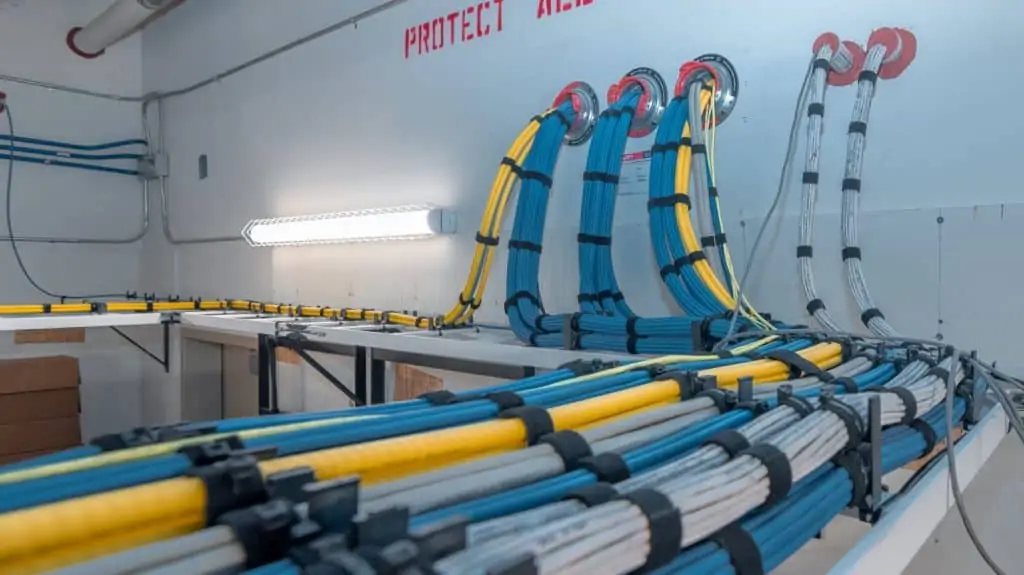
During construction, the cabling crew routes cable through approved supports and pathways, keeping appropriate separation from electrical systems. The route should avoid unnecessary sharp bends, crushing, tension and interference with existing building services. The correct cable rating and pathway treatment depend on the building conditions and applicable requirements.
New buildouts are often scheduled in phases: a rough-in before finishes close, followed by outlet and rack terminations later. Existing offices may require careful cable fishing, protection of furniture or off-hours work. The schedule should identify who provides access and who repairs openings when needed.
Step 4: Terminate, Label and Test
After cable is pulled, the crew installs the outlet hardware, terminates the patch panel and labels both ends of every run. Clear identifiers let the IT team match a workstation jack to a switch port without tracing an unknown cable.
Testing should be appropriate to the agreed scope. Wire-map testing catches connection faults, but formal Cat6 or Cat6A certification requires measurement against the relevant limits. If certification is in the contract, ask for link-by-link pass/fail reports at handoff.
Step 5: Review the As-Built Network
Before final acceptance, compare the original device plan with the installed outlets. Check any relocated drops, verify that every port has a label and request the port map and test documents promised in the scope. The IT provider can then patch switch ports and configure network equipment.
When asking for data cabling installation services in Las Vegas, share your floor plan, drop count, network closet location and buildout deadline. A contractor can use those details to identify the right phase of work and prepare a meaningful estimate.
Frequently Asked Questions
Quick answers about data cabling installation las vegas and planning your project.
How long does a commercial data cabling project take?
The schedule depends on drop count, cable pathways, access, building occupancy and testing requirements. An office buildout may involve a rough-in phase followed by later terminations and final testing.
What should a cabling contractor receive before installation?
Provide the current floor plan, outlet and device locations, network closet location, expected cable type, approved access hours and the dates when ceilings or walls will close.
What happens after the cables are pulled?
The installer terminates and labels both ends, tests the links to the agreed level, and provides the documentation included in the contract. The IT team then patches and configures network equipment.
Have a question about your specific installation? Call (702) 479-5566 or request a quote.
Have a data cabling project in Las Vegas?
We provide free estimates for ethernet, fiber, WiFi, VoIP, and low-voltage cabling across the Las Vegas valley. Call us or request a quote online.
Related Services
Commercial Data Cabling
Commercial data cabling for tenant improvements, office buildouts, and new construction. Coordinated with GCs and IT teams.
Learn more →Structured Cabling
Standards-based structured cabling systems for voice and data. Scalable infrastructure with proper documentation and cable certification.
Learn more →Cable Certification and Testing
Copper and fiber link testing with written results, so you know which drops pass, which fail, and exactly what needs fixing before you rely on them.
Learn more →More Articles
November 4, 2026 · 4 min read
Retail Store and POS Network Cabling: A Las Vegas Buildout Guide
Opening or remodeling a Las Vegas retail store? Plan POS Ethernet, payment terminals, stockroom WiFi, cameras and the network closet before walls close.
November 4, 2026 · 4 min read
Dental Office Data Cabling: Planning a Reliable Las Vegas Practice Network
Planning dental office data cabling in Las Vegas? Review operatories, imaging devices, reception, network closets, WiFi and vendor coordination.
Need data cabling in Las Vegas?
Las Vegas Data Cabling provides ethernet, fiber, WiFi, VoIP, and low-voltage cabling for businesses across the Las Vegas valley. Get a free quote.